
Export certificate paperwork,
sorted.
Your information (written messages, voice notes, photos, files) goes through Certisia's AI, which fills in the boxes of the health certificate one by one; the certificate is then filed as a draft on Expadon.
How it works
Five steps, from the first message to filing on Expadon. Scroll down to see them in the app.
-
1
Send the details.
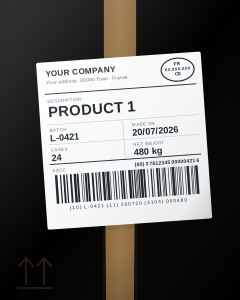
A simple message, as you would send a colleague: the destination, the products, the number of cases. No form to fill in.
-
2
Add your photos and documents.
A photo of a label, a delivery note, an invoice. Certisia reads the batches, weights and dates for you.
-
3
Certisia asks for what's missing.
A batch number, a weight: whatever is missing, Certisia asks you for it. You answer in writing or with a voice note.
-
4
The certificate is ready.
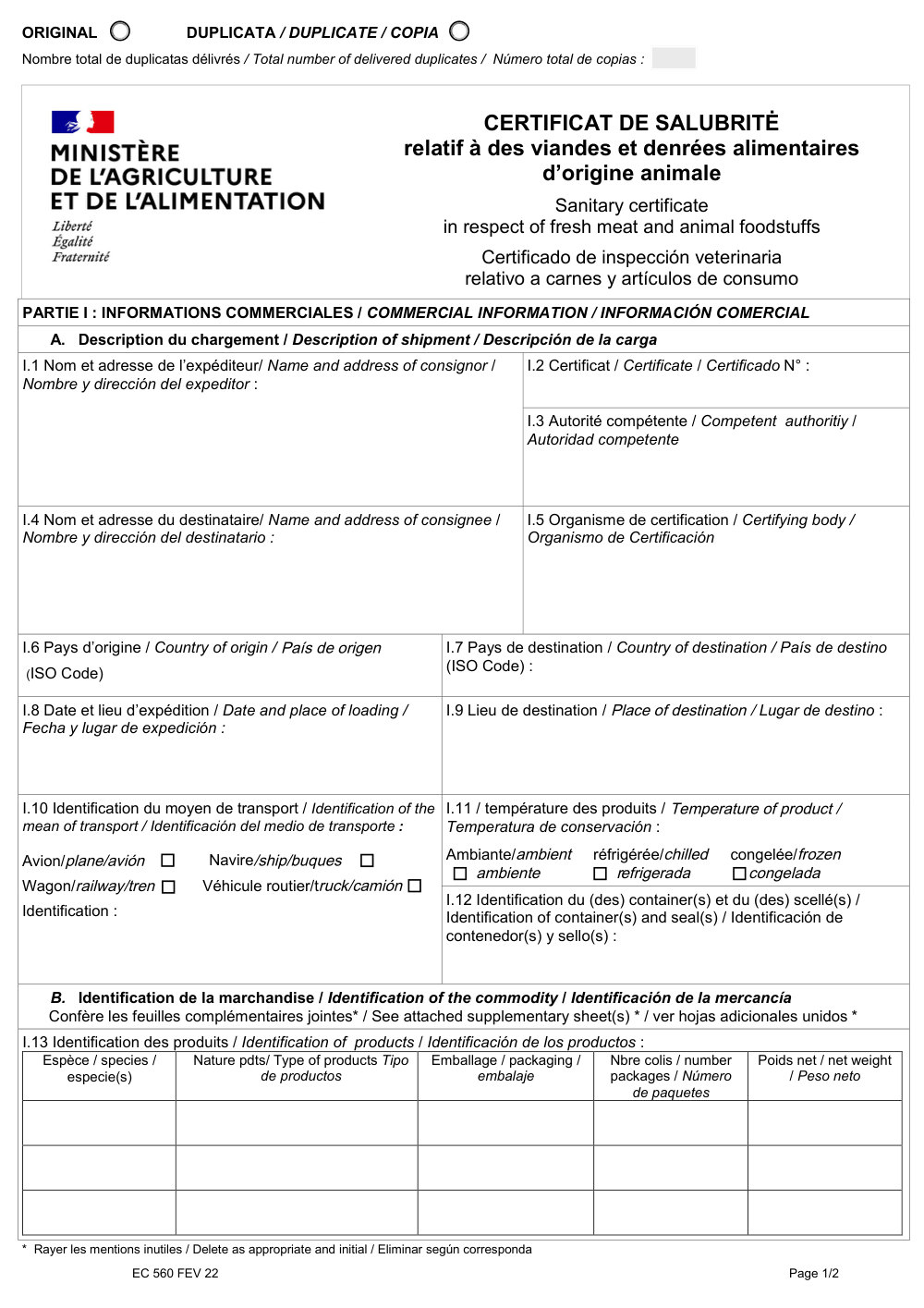
Certisia shows you the shipment summary and fills in the health certificate on the destination country's model.
-
5
You confirm, Certisia files on Expadon.
One tap on “Confirm”: the application arrives as a draft on Expadon. You review it, then you submit it.
teleprocedures.usager.expadon.fr/tableau-de-bord
 EXPADON 2
VOTRE NOM
Tableau de bord
Gestion des certificats
2 demande(s)
Numéro de la demandeMarchandisePaysStatut de la demande
FR-0XX-26-XXXXXXXDenrées d'origine animaleSingapourBrouillonNouveau
FR-0XX-26-XXXXXXXDenrées d'origine animaleJaponBrouillon
teleprocedures.usager.expadon.fr/tableau-de-bord/detail
EXPADON 2
VOTRE NOM
Tableau de bord / Consultation de la demande
Consultation de la demande
Detail de la demandeNuméro du certificat : FR-0XX-26-XXXXXXX
Statut : BrouillonNouveau
Télécharger les documentsImprimer les documentsSoumettre
Informations GénéralesEC 560 FEV 22Documents à joindre
L'accès à la marchandise pour une inspection physique s'étend depuis la date de soumission de la demande jusqu'à la signature du certificat.
Code SIRET : VOTRE ENTREPRISE - CODE POSTAL - VILLE
Date de fin de visibilité : 23/07/2026 Jusqu'à : 07:00
Modèle de certificat : Certificat de salubrité relatif à des viandes et denrées alimentaires d'origine animale
Couple pays / marchandise : ZONE Pays-tiers à l'UE/Denrées d'origine animale
 VOTRE ENTREPRISE
ADRESSE · CODE POSTAL VILLE FR-0XX-26-XXXXXXX AUTORITE VETERINAIRE FRANCAISE
FRENCH VETERINARY AUTHORITY
AUTORIDAD VETERINARIA FRANCESA VOTRE IMPORTATEUR
SINGAPORE SERVICES VETERINAIRES FRANÇAIS de
FRENCH VETERINARY SERVICES of
SERVICIOS VETERINARIOS FRANCESES
VOTRE DÉPARTEMENT FRANCE (FR) SINGAPOUR (SGP) 23/07/2026
ROISSY CHARLES DE GAULLE CHANGI AIRPORT (SIN) ✓ VOL AF XXX
LTA XXX-XXXX XXXX ✓ CONT. XXXX XXXXXXX · SCELLÉ XXXXXX ESPÈCE 1PRODUIT 1BOX24480 KG ESPÈCE 2PRODUIT 2BOX40100 KG
Liste des documents ajoutés3 document(s) ajouté(s)
Titre du documentUsage du document
Annexe certificat sanitaireAnnexe
Décharge de responsabilitéInstruction
Demande de certification de salubritéInstruction
Confirmation de soumission
Confirmez-vous la demande de soumission de votre demande à l’administration ?
AnnulerConfirmer
La demande de certificat a bien été soumise
On Expadon, all that's left is to submit.
Every application Certisia prepared is waiting on your Expadon dashboard, with the status “Brouillon” (draft).
-
1
Open the application: everything is filled in.
The general information is entered: your company, the date the goods can be inspected until, the certificate model.
-
2
The certificate filed on Expadon is filled in.
The one you see on Expadon is the certificate Certisia filed there: on the destination country's model, complete.
-
3
The attachments are added.
The annex, the waiver and the certification request are already attached to the application.
-
4
You review, then you submit.
A click on “Soumettre” (submit), then on “Confirmer” (confirm). Certisia never submits on your behalf.
-
5
It's sent.
The application moves to the status “Nouveau” (new): it has gone to the authorities.
5.5 hours of data entry a week, down to 25 minutes.
No more copying the same information into the order, then the certificate, then Expadon. Your teams keep that time for customers, quality and sales.
- The same information typed three times: order, certificate, Expadon.
- The right certificate model to find for each country.
- Paperwork piling up the day before each departure.
- One slip on the certificate can hold up the goods on arrival.
- A message, a photo or a document is enough to start the file.
- The model chosen for the product and the country.
- Whatever is missing is asked for before departure.
- The draft filed on Expadon, attachments included.
On the quay, in the workshop or at the office.
The same conversation on your phone and on your computer. Start a file in the workshop, review it at the office.
- On your phone iPhone and Android, to dictate from the quay.
- On your computer in the browser, nothing to install.
- A notification as soon as a file is ready to review.
Download on theApp StoreComing soonGet it onGoogle PlayComing soon
Your AI does the rest. Copy, paste, send.
Copy this text, paste it into your AI, send:
Where should we begin?
Install Certisia and connect to it: https://76b92140-32cd-4132-9eda-fd0dba4064cd.pub.instance.scw.eu/mcp
Frequently asked questions
Another question? Write to us at contact@certisia.fr.
Do I need to be good with computers?
No. If you can send a message or a voice note from your phone, you can use Certisia. No training is needed.
Can Certisia file anything without our approval?
No. Certisia prepares the file and tells you what is missing. Nothing is created or deleted on Expadon without your confirmation, and you always submit the application yourself.
Does Certisia issue the certificate?
No. Certisia prepares the draft certificate and the application. Signing and issuing the official certificate remain with the veterinary services, as today.
Which products?
Every product of animal origin that goes through Expadon: seafood, milk and cheese, meat and charcuterie, eggs, honey and other animal products, animal feed and by-products.
What happens when a certificate model changes?
Certisia checks the published models every day. A changed model is flagged to you, and the next certificate is drawn up on the new model.
Where is our data, and who can see it?
Certisia's server is hosted in France. Your company's data stays in your space, open only to the people you authorise. The details are in the privacy policy.
Does Certisia use artificial intelligence?
Yes, to read your documents, understand your voice notes and fill in the certificates. We only use providers who commit not to keep your content and not to use it to train their models. You always review the result before filing.
What about platforms other than Expadon?
Certisia files on Expadon today. Other platforms will follow, on the same principle. Tell us which ones matter to you: contact@certisia.fr.
How do I get started?
Create your account with your work email address, then tell us about your company. We open your space after checking.
Can I use Certisia from ChatGPT, Claude or Codex?
Yes. Add Certisia to your assistant with the address https://76b92140-32cd-4132-9eda-fd0dba4064cd.pub.instance.scw.eu/mcp: in ChatGPT, "Add custom MCP server"; in Claude, "Add custom connector"; in Claude Code or Codex, one command. Your assistant offers to link your account, or to create it. Then talk to it as you would to Certisia and drop your files in: it forwards them as they are, and shows you every card before confirming. The details, for assistants (in French): llms.txt.
Your next shipment, prepared by Certisia.
Create your account with your work email address, then tell us about your company. We open your space after checking.
- Nothing is filed without your approval
- No training needed
- Server hosted in France
A question? Write to us at contact@certisia.fr